Corporate hardware decisions require balancing daily operating speeds against long-term data preservation requirements. Evaluating the fundamental mechanics of your storage hardware allows you to maximize office productivity while controlling budget expenses.
Understanding the mechanical design of traditional hard disk drives (HDDs)
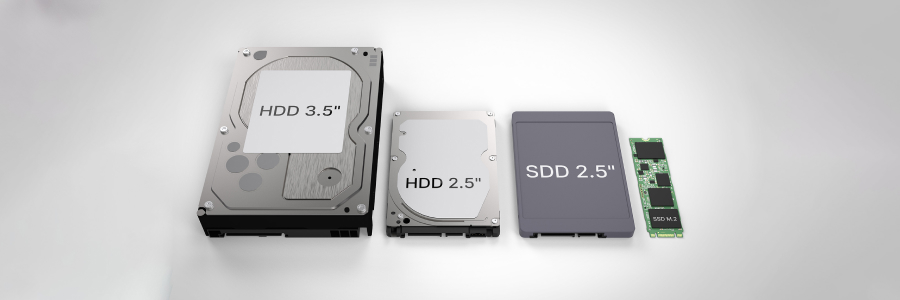
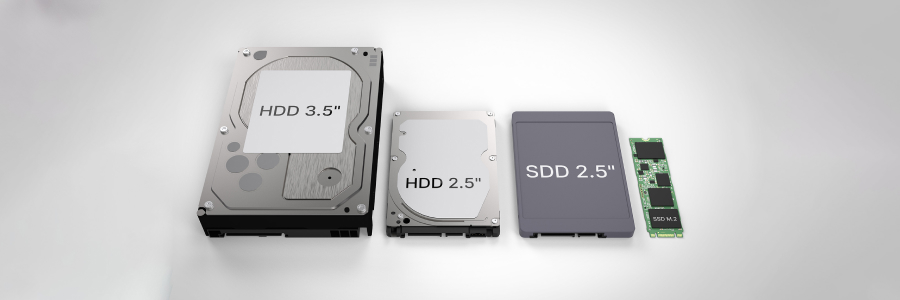
Mechanical hard drives operate through an internal design reminiscent of an old-fashioned media player. Data sits on a circular metal platter coated with a thin magnetic layer that spins rapidly around a central spindle. A tiny motorized arm sweeps across the spinning surface to read or modify digital sectors using magnetic orientation. Because these components rely on physical motion to operate, the structural layout imposes speed limits based on how many rotations the disk can complete each minute.
Evaluating the architecture of solid-state drives (SSDs)
Solid-state alternatives abandon mechanical components altogether, opting instead for integrated circuit assemblies. These drives store data using non-volatile flash memory chips, managed by an embedded microcontroller that handles processing instructions. Without moving parts, information moves across electronic circuits almost instantly. This absence of internal friction shifts the focus from physical mechanics to pure electronic bandwidth, creating a far more responsive environment for computing tasks.
Comparing operational reading and writing performance
The performance gap between mechanical (SSD) and silicon (HDD) storage impacts daily employee workflows significantly. Traditional HDDs struggle with reading data scattered across different sectors because the internal arm must physically relocate to find each piece. SSDs, meanwhile, can access any location on the flash chip simultaneously, achieving file copy speeds that regularly surpass 500 megabytes per second. Upgrading your workstation with SSDs can dramatically improve performance — slashing boot times to just seconds, enabling resource-heavy applications to launch instantly, and eliminating bottlenecks during demanding data transfers.
Analyzing cost dynamics and volumetric capacity
While flash storage is incredibly fast, magnetic hard drives are still the cheapest option for storing massive amounts of data. Because magnetic drives are so cheap to produce, they allow companies to store terabytes of backup and archival data at a fraction of the cost of flash storage. However, for everyday office work where speed is key, modern laptops rely on flash storage to keep your apps running fast and responsive.
Assessing structural durability and operational acoustics
For mobile workforces and field personnel, physical resilience is a necessity. The delicate moving parts inside a traditional drive make the hardware vulnerable to sudden drops, sharp vibrations, and physical impacts that can misalign the internal arm. Solid-state alternatives mount memory cells directly onto a stable circuit board, allowing the device to survive physical shocks without losing data. Furthermore, flash chips in SSDs operate in complete silence, removing the noticeable whirring and clicking sounds commonly associated with busy office desktops.
Determining the optimal hybrid infrastructure storage option
Maximizing your IT budget often involves combining both technologies into a structured, tiered deployment. Using low-capacity SSDs as your primary boot device is an efficient way to manage your operating system files and everyday productivity software. Meanwhile, high-capacity mechanical drives can be housed inside server racks or network-attached devices to store older financial records and media archives. This balanced approach provides exceptional operating speeds where employees notice it most while keeping storage expansion costs affordable.
Implementing a thoughtful mix of HDDs and SSDs ensures that your team stays productive while your long-term records remain secure. If your organization requires assistance upgrading existing computer fleets, designing a secure hybrid server environment, or auditing your current data backup hardware, reach out to us.